
It listens on your phone
Recognition runs on the device, with a Hebrew speech model and a multilingual one for translations. Download the model once; after that the alarm works without internet. The app doesn't need an account.
For Android · Launching soon
Mitzvah Alarm rings until you say Modeh Ani out loud. The Hebrew, a transliteration and a translation are right there on the screen, and the listening happens on your phone.
Not in the Play Store yet. When it is, this page will link to it.
מוֹדֶה אֲנִי (Modeh Ani)
The first words of the day
Modeh Ani is the line many Jews say on waking. Mitzvah Alarm shows it in Hebrew, in letters you can sound out, and in your language, so whoever is holding the phone can say it.
מוֹדֶה אֲנִי לְפָנֶיךָ, מֶלֶךְ חַי וְקַיָּם, שֶׁהֶחֱזַרְתָּ בִּי נִשְׁמָתִי בְּחֶמְלָה, רַבָּה אֱמוּנָתֶךָ.
Modeh ani lefanecha, melech chai vekayam, shehechezarta bi nishmati bechemlah, rabah emunatecha.
I thank You, living and eternal King, for You have mercifully restored my soul within me. Great is Your faithfulness.
How it works
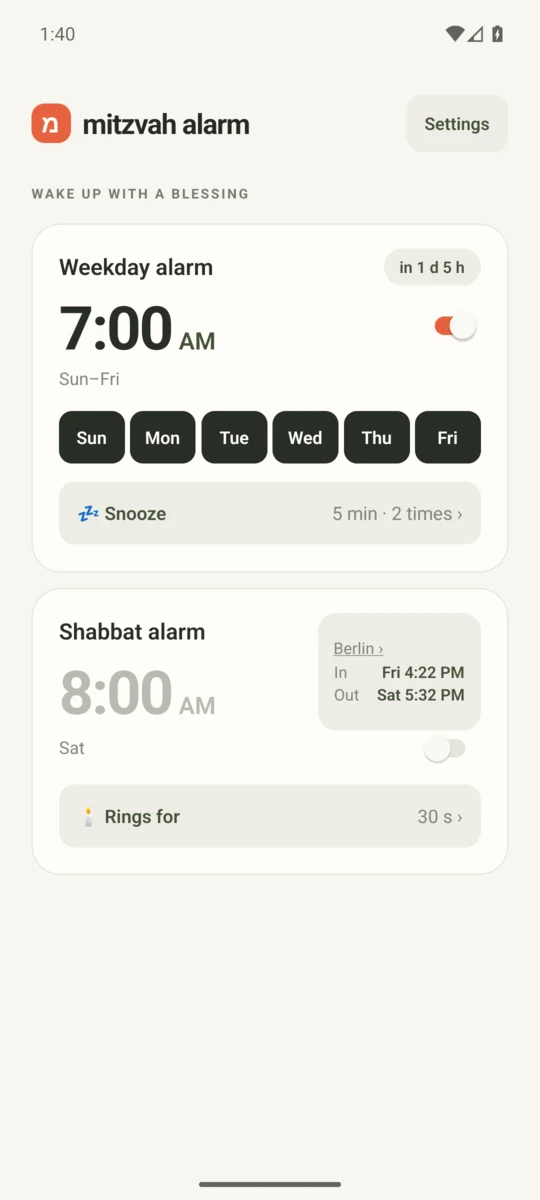
Pick a time and the days of the week. A second, separate alarm is there for Shabbat, off until you turn it on.
When the alarm rings, it takes over the screen and puts the blessing in front of you. Stopping it asks for your voice, not a swipe.
Say Modeh Ani. When the app hears the words, the alarm stops. If you can't speak out loud, Dismiss without talking is on the alarm screen.
What's inside
Recognition runs on the device, with a Hebrew speech model and a multilingual one for translations. Download the model once; after that the alarm works without internet. The app doesn't need an account.
Read it the way that suits you. Choose from nine supported languages, including Hebrew.
Choose the time and which days it rings, with snooze if you want it. Saying the blessing is what turns it off.
Set a separate time and a ring length. It rings, then stops on its own, with nothing to say or tap.
Turn on Shabbat, sunset and tefillin times if you'd like them on screen. They're calculated on your phone from the city or time zone you choose.
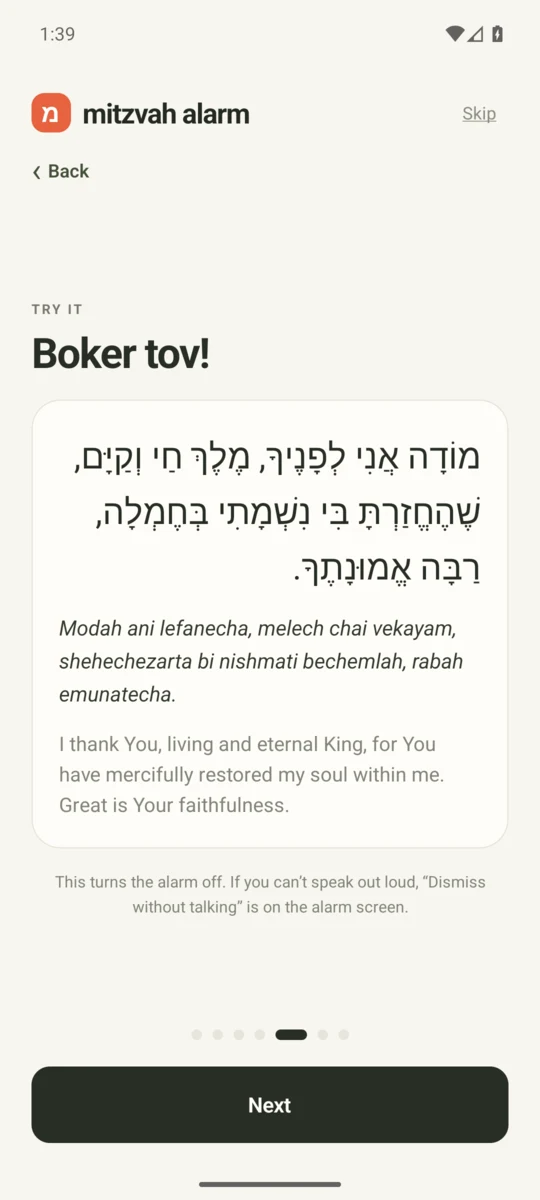
Try it first
The first time you open the app it walks you through a practice round, using the same screen the alarm will use. Say the blessing, see it recognised, and you will know what to expect at 7:00.
Speech recognition isn't perfect, and phones differ in battery settings, volume and microphones. Test your alarm before you depend on it, and keep a backup alarm until you trust it. Galtworks makes no religious rulings: how you use an alarm is for you and your own rabbi to decide.
Plainly
Speech recognition happens inside the app on your phone. There's no account to make and nothing to sign up for. The Privacy Policy spells out what the app does and doesn't collect.
Galtworks plans to offer an optional way to support the person who makes the app. It will unlock nothing: every feature is available to everyone. It is not a charity or a donation to one. There is no payment checkout on this website.
Questions
Mitzvah Alarm is for Android and is launching soon. There's no store listing yet, so there's nothing to download from this page. If you'd like to ask something in the meantime, email us.
Download a speech model first: about 72 MB for Hebrew or 60 MB for translations. After that, recognition and the alarm work offline. The app also checks for public announcements when it opens; the privacy policy explains those connections.
The alarm screen has a Dismiss without talking option, so a quiet household or a hoarse morning doesn't trap you with a ringing phone. Complete a short sequence of taps to dismiss it without speaking.
No. It rings for the length you set and then stops by itself. Whether to use any alarm on Shabbat is a personal question for you and your rabbi, and Galtworks doesn't offer a ruling.
Android comes first, and there is no iPhone release to announce yet.
Oleksii Lipovetskii, under the name Galtworks. Write to o.lipovetskii.dev@gmail.com or see the Support page.
Write to Galtworks any time. Mitzvah Alarm is coming to Android soon.